




A pivot summary groups records and applies a defined calculation, such as a count or sum. Begin with a complete source dataset and decide what question the summary should answer before moving fields into a report.
Use the original fictional practice data below. A pivot can summarise incorrect or incomplete records just as efficiently as correct ones, so source checks remain essential.

Define the source records
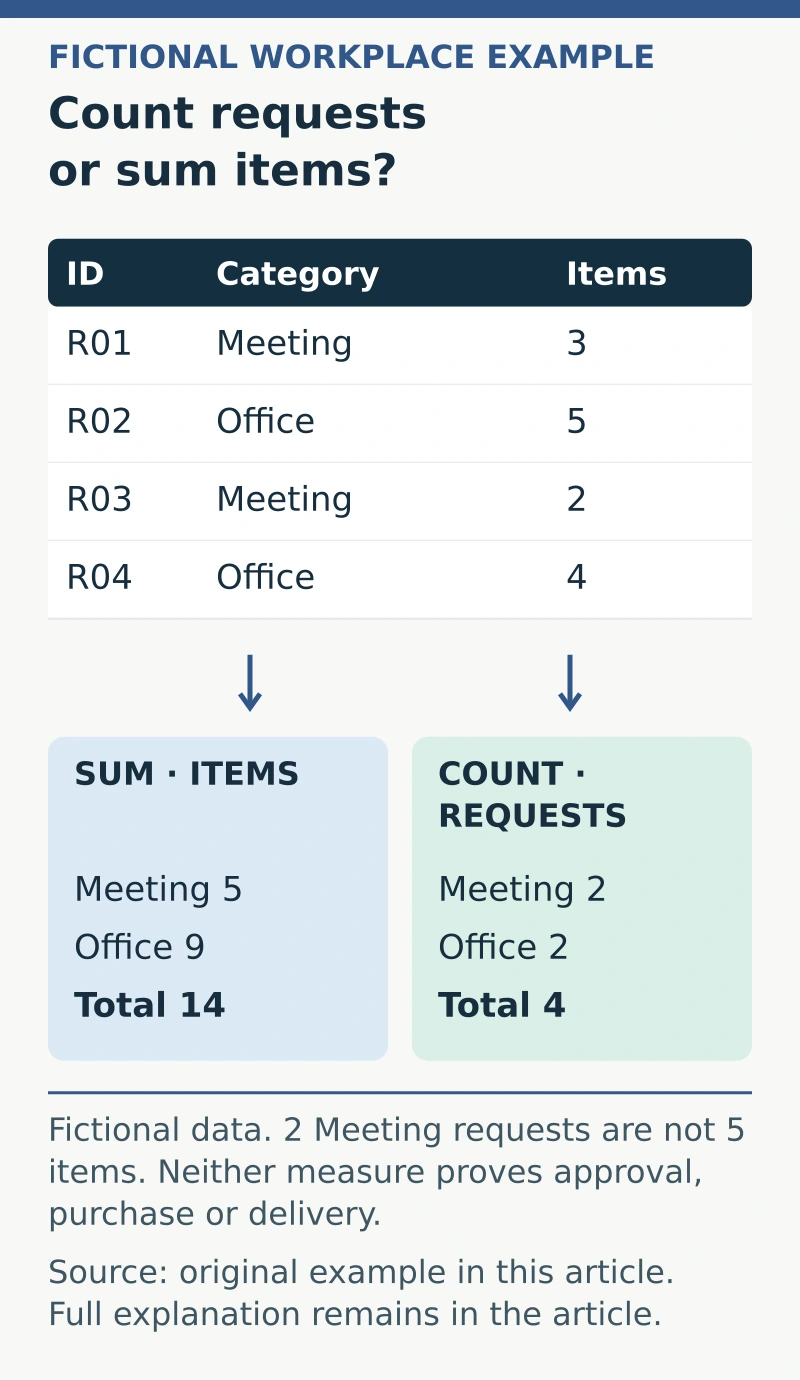
In an authorised practice workbook, use headings Request ID, Category and Quantity. Enter:
- R01, Meeting, 3.
- R02, Office, 5.
- R03, Meeting, 2.
- R04, Office, 4.
Each row represents one invented request, and Quantity means the number of ordinary items in that request. There are four records and fourteen items overall.
Keep one header row, consistent field meanings and valid numeric quantities. Exclude a separate totals line from the source records so it is not counted as another request.
Choose the summary question
For “how many items are requested by category?”, group by Category and summarise Quantity using a sum. The expected totals are Meeting 5 and Office 9, with a grand total of 14.
For “how many requests are in each category?”, count the request identifiers. The expected counts are Meeting 2 and Office 2, with four requests overall.
Those are different questions. A result of 2 for Meeting is correct for request count and incorrect for the total quantity requested.
Use the application’s documented pivot tools
Microsoft’s PivotTable guidance explains selecting source data, arranging fields and checking summary calculations. Follow the current documentation for the application and version used.
Check whether the values are being summed or counted. Mixed data types can affect how a field is interpreted, so a plausible total is not enough to establish the correct calculation.
Give the summary meaningful labels, such as “Total items” or “Number of requests”, instead of leaving an ambiguous heading that the next reader must interpret.
Use a pivot-check record
Verify:
- Question: the business measure and grouping required.
- Source: complete record range or approved table.
- Definitions: one row’s meaning and each relevant field.
- Calculation: count, sum or another justified summary.
- Filters: subset currently included and what is excluded.
- Reconciliation: grouped totals compared with independent source checks.
- Refresh: method and responsibility after source data changes.
Do not assume adding a source row automatically updates every existing summary. Check the actual source range and refresh behaviour before reporting a new result.
Explain the limits of the summary
The fictional pivot shows request counts and quantities. It does not establish whether the items were approved, purchased or delivered; those are different fields and process stages.
Keep sensitive information out of a broader report unless authorised and necessary. Retain enough source reference for an appropriate reviewer to check the result. A useful pivot summary has a clear question, correct calculation and verified source coverage, allowing readers to understand exactly what the totals represent.
If you are practising reporting skills for an application, compare the exercise with the reporting duties described in the guide to administration roles and the actual vacancy.